Updates · 4 Oct 2026 · 2 min read
Moving to ORYS from another system
Bring your staff, balances, loans and papers over from Excel. ORYS checks every row before anything is saved.
Most companies don't start from zero. They already have staff records in another app or in Excel, leave balances halfway through the year, and loans still being paid.
Here is how that moves into ORYS.
Everything starts from Excel
Each import in ORYS has a Template button. The template comes with a second sheet listing your own departments, leave types and staff, so names can be copied exactly.
Column names don't have to match perfectly. ORYS recognises common headings like "ID No" or "Joined", and tells you about any column it doesn't use.
What you can bring over
- Staff — personal details, ID and passport numbers, join date, salary, department, job title and who they report to
- Bank accounts
- Leave balances — including days already taken this year, so mid-year balances carry over
- Loans still being paid — amount left, monthly deduction and start month
- Expat papers — passport, work permit, visa, insurance and medical, with expiry dates
- Public holidays and the duty roster
Nothing is saved until you check it
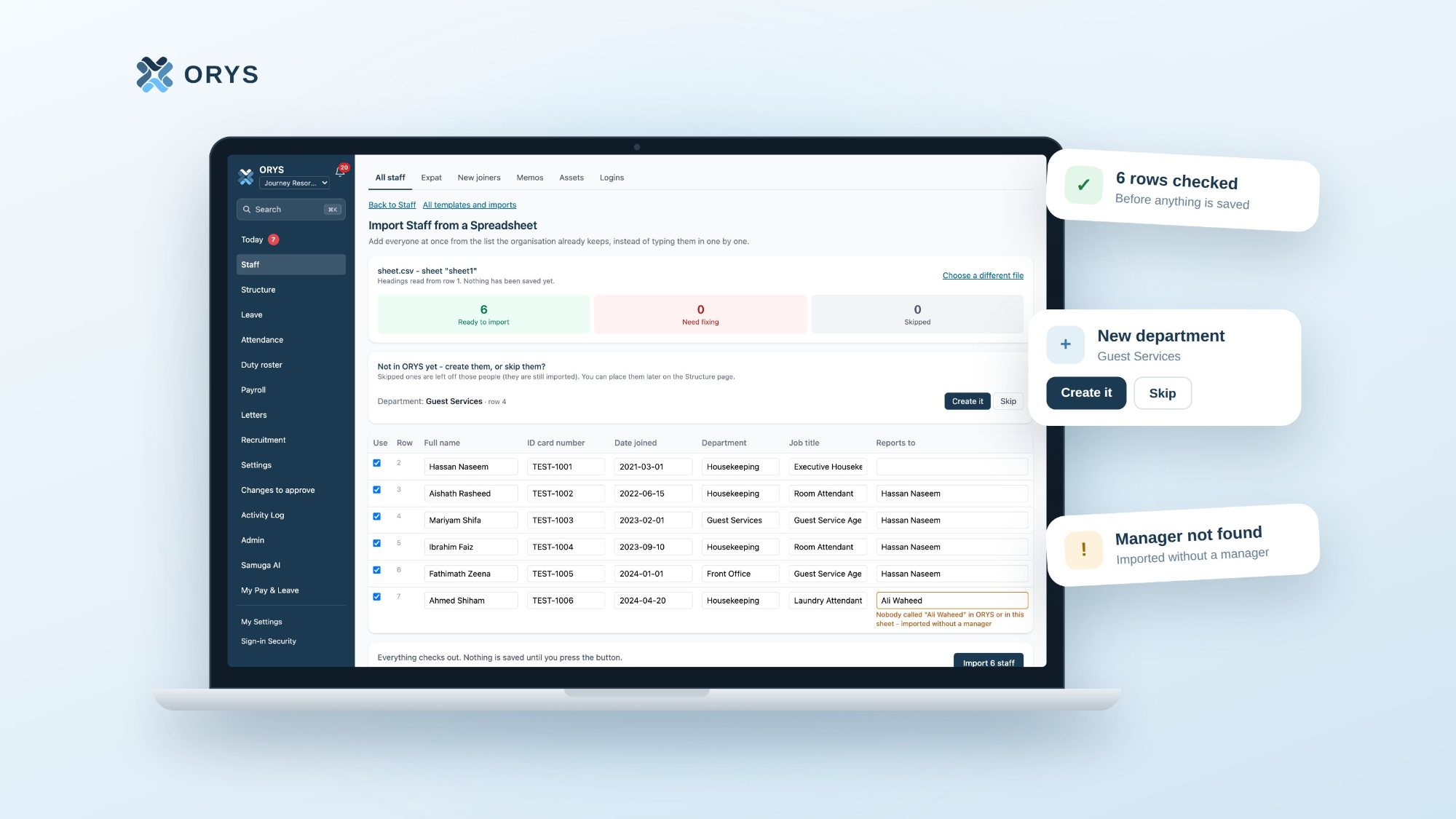
Every import shows a preview first. Rows with a problem are marked, with the reason written underneath:
- missing details, wrong dates or duplicates
- a bank account in the wrong format
- a loan deduction above the company's limit
- a paper that has already expired
If a department or job title doesn't exist yet, ORYS asks whether to create it or skip it. Nothing goes in until you press Import.
Run one payroll side by side
Before switching fully, generate the month's payroll in ORYS as a draft. Staff don't see it. Compare it with your old system, fix anything that's different, and generate again. Only when it matches does it go to a Director for approval.
A few things are set by hand
Shifts, your company's own rules on the Company Policy page, and passport photos are added inside ORYS rather than imported. The rules come with Employment Act defaults, so most companies only change what's different for them.
New joiners fill in their own details
After the move, new staff don't need to be typed in. HR sends a private link, the joiner fills in their details on their phone, and HR approves.
ORYS is free for the first 3 months, so you can bring your data over and run a payroll side by side before deciding.
ORYS is built by Samuga Creative Pvt Ltd, Malé.